





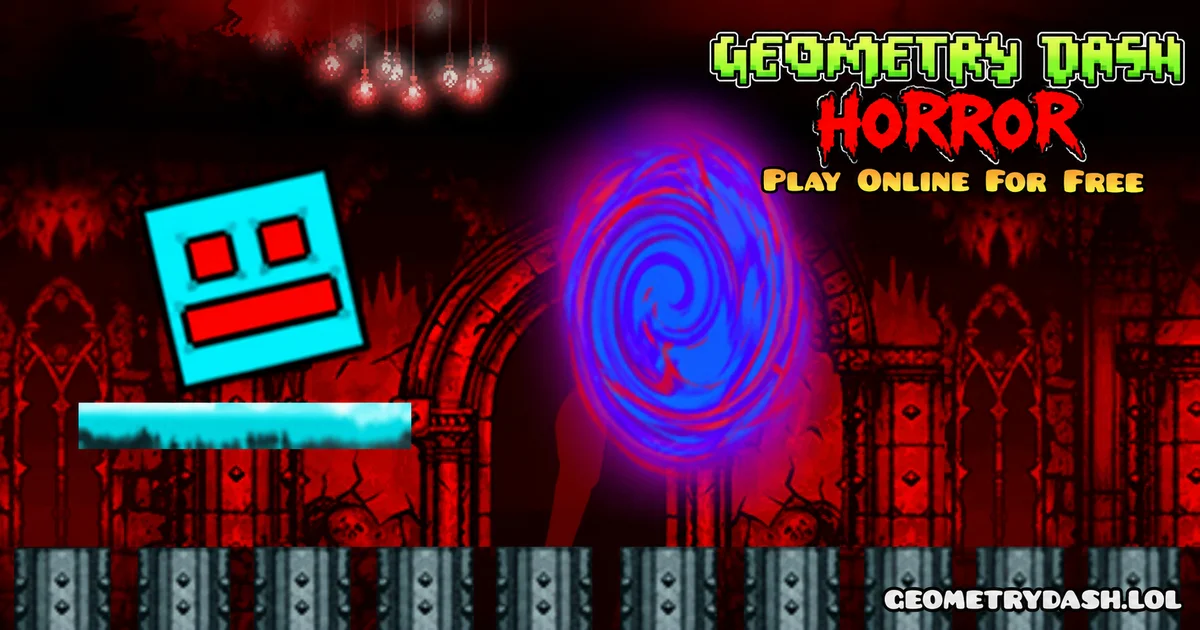
Play Geometry Dash Horror online for free! Guide a small cube through spooky platform levels filled with sharp spikes, gaps, and dangerous traps. The dark setting makes even familiar jumps feel more surprising.
This game keeps the simple Geometry Dash-style idea of timing your jumps, but adds a horror theme and seven challenges with different difficulty levels. Watch the next obstacle carefully because one bad jump can end your attempt.
Can you make it through the hardest stage? Start Geometry Dash Horror and test your timing!
What is Geometry Dash Horror?
Geometry Dash Horror is a horror-themed browser platform game released by ajerartech. It uses a moving cube, obstacle-filled routes, and short retries after a mistake. Unlike the official RobTop Geometry Dash levels, this is a separate browser game inspired by that style.
The game is known for its seven levels, which move from beginner-friendly challenges to much harder obstacle patterns. The aim is to get through the course without crashing into spikes, walls, or other hazards.
Gameplay of Geometry Dash Horror
The cube advances through the level while you time its jumps. Early sections help you judge jump height and how much ground the cube covers before landing. Later routes place dangerous objects closer together, so the landing after one jump may be as important as the jump itself.
Dark backgrounds, creepy shapes, and sudden visual surprises give the game its horror atmosphere. They do not change your main task: stay focused on the safe path ahead and react at the right moment.
Platform
You can play this game directly in your web browser on any device. It works on computers, laptops, tablets, and phones.
How to Play Geometry Dash Horror?
- Choose a level: Begin with an easier stage to learn how far the cube jumps.
- Watch the next hazard: Look ahead for spikes, gaps, and obstacles near the landing area.
- Time the jump: Press just before reaching a dangerous section, not after the cube touches it.
- Plan the landing: Avoid landing immediately in front of another spike or block.
- Retry carefully: If a jump fails, remember the obstacle and make a small timing change.
Controls
- PC: Use the left mouse button, Space, or the jump key offered by the browser edition.
- Mobile: Tap the screen to jump.
- Tip: Start with short presses to learn the cube's movement before trying fast combinations.
Tips and Tricks for Geometry Dash Horror
- Begin with an easier level: Learn the cube's normal jump distance before choosing a harder course.
- Look at the landing zone: Clearing the first spike is not enough if you land on the second one.
- Ignore scary decorations: Focus on solid obstacles rather than background effects.
- Remember close obstacle groups: Several short jumps often need more careful timing than one large gap.
- Avoid extra inputs: Random clicking can ruin a jump that was already timed correctly.
- Repeat the difficult part: Keep the timing that worked and change only the step that caused the crash.
How Many Levels Does Geometry Dash Horror Have?
The well-known browser release of Geometry Dash Horror includes seven stages. They move from easy introductory routes to expert-level challenges. This gives new players a place to learn the controls before facing tighter jumps and denser hazards.
It is better to finish an easier route cleanly before choosing the most difficult one. Later levels punish early or late jumps more quickly, especially when spikes appear close to the edge of a platform.
What Makes the Horror Version Different?
The difference is mainly the dark theme and the frightening presentation. You still play a precision platform game, not a survival game with doors, cameras, or inventory puzzles. The challenge comes from obstacle timing rather than fighting monsters.
Features of Geometry Dash Horror
- Seven stages in the well-known browser release.
- Automatic movement and timed jump controls.
- Spikes, gaps, blocks, and closely spaced obstacles.
- Horror-themed backgrounds and creepy visual effects.
- Increasing difficulty from early stages to expert routes.
- Quick retries after a failed jump.
Geometry Dash Horror Online
You can play this browser game directly on its page without installing a separate desktop application. If the controls do not respond, click or tap the game area and check the available jump input.
Is Geometry Dash Horror Free?
Yes. The browser edition offered here is free to play. It is a separate fan-style game, not the paid original Geometry Dash release.
Similar Games
If you’re a fan of Geometry Games, you’ll definitely enjoy these too:
- Halloween Geometry Dash
- Geometry Dash Monster
- Geometry Dash Bloodbath
- Geometry Dash Hardcore
- Geometry Dash Deadlocked
- Geometry Dash Grief
- FNaF 1
- Granny
- Geometry Dash Nemesis
- Geometry Dash Badland
- Geometry Dash Kenos
- Among Us
- Subway Surfers
- Geometry Dash
- Geometry Dash World
FAQs About Geometry Dash Horror
Is Geometry Dash Horror an official Geometry Dash level?
No. It is a separate browser platform game inspired by Geometry Dash.
How many levels are in Geometry Dash Horror?
The well-known ajerartech version contains seven levels.
What is the main goal?
Finish the obstacle route without hitting spikes, blocks, or other hazards.
What happens when you crash?
The attempt ends, and you can retry the level.
Can you play Geometry Dash Horror on a phone?
Yes. You can play on your phone or tablet in a web browser using the touch controls.
Is this game suitable for very young players?
It uses horror-themed visuals and surprise effects that may scare younger children.
Conclusion
Geometry Dash Horror combines familiar jumping rules with a darker setting and seven levels of increasing challenge. Choose a manageable stage, learn each jump, and concentrate on the safe landing path to improve your runs.